 f0c65a47ed
# 3.2.0 / 2020-12-07

**General**

- Add Team invites.
  - Team invites are links containing a token that allow a user to join a team without knowing the team password
  - Captains can generate invite tokens for their teams
  - Admins can generate Team invite links as well
- Improved Team handling
  - Prevent team joining while already on a team
  - Return 403 instead of 200 for team join/create errors
  - Allow team captains whose teams haven't done anything to disband their team
- Allow for uploading navbar logo, favicon, and index page banner during initial setup
- Fixed issue in teams mode where a user couldn't unlock a hint despite their team having enough points
  - The fix for this is essentially to allow the user's points to go negative
- Imports have been made more stable
  - This is primarily done by killing MySQL processes that are locking metadta
  - This is a subpar approach but it seems to be the only solution to avoid a metadata lock in MySQL. This approach did not appear to be needed under Postgres or SQLite

**API**

- Addition of `POST /api/v1/teams/me/members` to generate invite tokens for teams
- Fixed an issue in `POST /api/v1/awards` where CTFd would 500 when a user could not be found by the provided `user_id`
- `POST /api/v1/unlocks` in teams mode now uses the team's score to determine if a user can purchase a hint
  - Properly check for existing unlocks in teams mode in `POST /api/v1/unlocks`
- `/api/v1/notifications` and `/api/v1/notifications/[notification_id]` now have an html parameter which specifies the rendered content of the notification content

**Themes**

- Add Team Invite icon and Disband Team icon to teams/private.html
- Add teams/invite.html file to handle team joining with invites
- Added syntax highlighting to challenge descriptions, pages, hints, notifications, comments, and markdown editors
  - This is done with `highlight.js` which has been added to `package.json`
- Fix notifications to properly fix/support Markdown and HTML notifications
  - Notifications SQL Model now has an html propery
  - Notifications API schemas now has an html field
- Removed MomentJS (see https://momentjs.com/docs/#/-project-status/) in favor of dayjs
  - dayjs is mostly API compatible with MomentJS. The only major changes were:
    - dayjs always uses browser local time so you don't need to call `.local()`
    - dayjs segments out some MomentJS functionality into plugins which need to be imported in before using those features
- Fixed issue in `challenge.html` where the current attempt count would have a typo
- Fixed issue in `challenge.html` where the max attempts for a challenge would not show if it was set to 1
- Edit donut charts to have easier to read legends and labels
- Make data zoom bars thinner and more transparent
- Add logo, banner, and favicon settings to the setup.html

**Plugins**

- The `auth.register` (`/register`) endpoint now accepts a `?next=` parameter to define where to redirect to after registration
- There is now a `registered_only` decorator to redirect users to `auth.register` (`/register`) instead of `auth.login` (`/login`)
- Don't run `db.create_all()` as much during plugin upgrade or during imports
  - By avoiding this we can let alembic and migrations do more of the table creation work but this means that plugins specifically opt into `app.db.create_all()` and will not implicitly get it through `upgrade()`.
  - This means plugins that run `upgrade()` without a migrations folder (no idea who would do this really) will need to upgrade their code.
- The plugin `upgrade()` function now accepts a `lower` parameter which specifies what lower revision should be used to start from.
  - This is used to support plugin migrations during import so that we can import data directly at the point that the import was taken from
  - `lower="current"` means to use the current revision and `lower=None` would mean to use the absolute base revision (e.g. plugin's first installation)
  - By default this doesn't change `upgrade()` behavior

**Admin Panel**

- Add Favicon uploading to the Admin Panel
- Move Logo uploading to the Theme tab in the Admin Panel
- The challenge left side bar tabs have been rewritten into VueJS components.
  - This fixes a number of issues with the consistency of what data is deleted/edited in the challenge editor
  - This also prevents having to refresh the page in most challenge editing situations
- Fixed a possible bug where the update available alert wouldn't go away on server restart
- Examples for regex flags are now provided
- Wrong submissions has been renamed to Incorrect Submissions
- Graphs in the Admin Statistics page will now scroll with mouse wheel to improve browsing large datasets
- Fixed an issue where Users/Teams could be created with a null password

**Deployment**

- A restart policy set to `always` has been added to nginx in docker-compose
- Rename `requirements.txt` to `requirements.in` and generate `requirements.txt` using `pip-tools` under Python 3.6
- `UPLOAD_PROVIDER` no longer has a default `filesystem` set in config.ini. Instead it is defaulted through `config.py`

**Miscellaneous**

- The `psycopg2` dependency in development.txt has been removed in favor of `psycopg2-binary` which was updated to 2.8.6
- The `moto` dependency in development.txt has been updated to 1.3.16
- Add `pip-tools` to `development.txt`
- Add `import_ctf` and `export_ctf` commands to `manage.py` and deprecate `import.py` and `export.py`
- Override the `MAIL_SERVER` config with the `TESTING_MAIL_SERVER` envvar during tests
- `ping` events in the notification event handler have been fixed to not send duplicates




What is CTFd?
CTFd is a Capture The Flag framework focusing on ease of use and customizability. It comes with everything you need to run a CTF and it's easy to customize with plugins and themes.
Features
- Create your own challenges, categories, hints, and flags from the Admin Interface
- Dynamic Scoring Challenges
- Unlockable challenge support
- Challenge plugin architecture to create your own custom challenges
- Static & Regex based flags
- Custom flag plugins
- Unlockable hints
- File uploads to the server or an Amazon S3-compatible backend
- Limit challenge attempts & hide challenges
- Automatic bruteforce protection
- Individual and Team based competitions
- Have users play on their own or form teams to play together
- Scoreboard with automatic tie resolution
- Hide Scores from the public
- Freeze Scores at a specific time
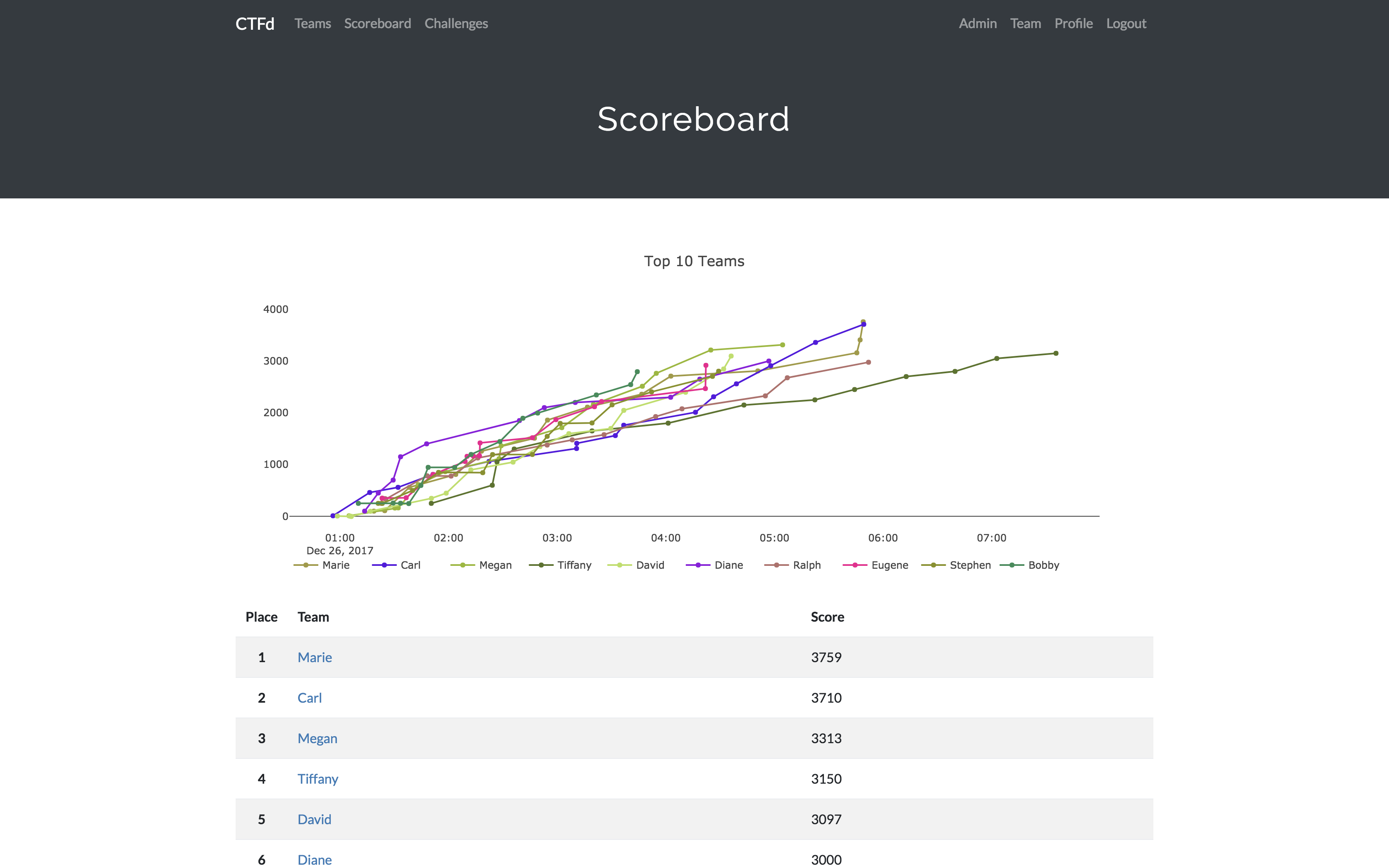
- Scoregraphs comparing the top 10 teams and team progress graphs
- Markdown content management system
- SMTP + Mailgun email support
- Email confirmation support
- Forgot password support
- Automatic competition starting and ending
- Team management, hiding, and banning
- Customize everything using the plugin and theme interfaces
- Importing and Exporting of CTF data for archival
- And a lot more...
Install
- Install dependencies:
pip install -r requirements.txt- You can also use the
prepare.shscript to install system dependencies using apt.
- You can also use the
- Modify CTFd/config.ini to your liking.
- Use
python serve.pyorflask runin a terminal to drop into debug mode.
You can use the auto-generated Docker images with the following command:
docker run -p 8000:8000 -it ctfd/ctfd
Or you can use Docker Compose with the following command from the source repository:
docker-compose up
Check out the CTFd docs for deployment options and the Getting Started guide
Live Demo
Support
To get basic support, you can join the MajorLeagueCyber Community:
If you prefer commercial support or have a special project, feel free to contact us.
Managed Hosting
Looking to use CTFd but don't want to deal with managing infrastructure? Check out the CTFd website for managed CTFd deployments.
MajorLeagueCyber
CTFd is heavily integrated with MajorLeagueCyber. MajorLeagueCyber (MLC) is a CTF stats tracker that provides event scheduling, team tracking, and single sign on for events.
By registering your CTF event with MajorLeagueCyber users can automatically login, track their individual and team scores, submit writeups, and get notifications of important events.
To integrate with MajorLeagueCyber, simply register an account, create an event, and install the client ID and client secret in the relevant portion in CTFd/config.py or in the admin panel:
OAUTH_CLIENT_ID = None
OAUTH_CLIENT_SECRET = None
Credits
- Logo by Laura Barbera
- Theme by Christopher Thompson
- Notification Sound by Terrence Martin