 7d56e59e1a
# 3.4.0 / 2021-08-11

**General**

- Added the ability to have Challenge Topics
  - Challenge Topics are small topic strings which are only visible to Admins
  - They should denote what topics a given challenge involves
- Added `connection_info` to Challenges to allow Admins to more easily specify the connection info for a challenge
- Added ability to import CSVs of users, teams, and challenges
- Added ability to limit the total number of teams
- Pages now have access to variables `ctf_name`, `ctf_description`, `ctf_start`, `ctf_end`, `ctf_freeze`. (e.g. `{{ ctf_name }}`)
- IP Addresses in the Admin Panel will now show the city of the IP address as well as the country
- Make User Mode it's own dedicated tab in the setup flow and more clearly explain what each user mode does
- Added the ability to have a registration password
  - Does not currently apply to SSO/auth provider or API based account creation
- Prevent users from participating with challenges if their profile is not complete (i.e. haven't filled out all required custom fields)
- Fixed an issue where admins couldn't see some challenges in the add requirements interface
- Fixed an issue where a challenge couldn't be accessed beacuse it had prerequisites on a deleted challenge
- Fixed an issue where User profiles could not be loaded in the Admin Panel due to missing/invalid Tracking IP addresses
- Fixed an issue where users with authentication provider accoutns would get an error when attempting to login
- Fixed an issue where MajorLeagueCyber config from config.ini was not being respected

**API**

- Added `connection_info` field to `/api/v1/challenges/[challenge_id]`
- Added `/api/v1/topics` for admins to create/delete topics
- Added `/api/v1/challenges/[challenge_id]/topics` for admins to list the topics on a challenge
- `/api/v1/challenges` will now sort by ID as value to better standardize API output with different databases
- `/api/v1/configs` will now provide an error message when provided Config values are too long
- `PATCH /api/v1/teams/[team_id]` will now only let team members be team captain
  - No security issues here, it would just be invalid data.

**Themes**

- CTFd now has the `THEME_FALLBACK` option enabled by default. This allows users to provide incomplete themes. Missing theme files will be provided from the built-in core theme
- CTFd will now pass the title of a Page over to the template when rendering
- No longer show the token type in user settings
- Added `window.BETA_sortChallenges` to `/challenges` so that theme code can more easily define how to sort challenges
  - Note that this functionality is beta because we expect to revamp the entire themes system
- Added `window.updateChallengeBoard` to `/challenges` so that theme code can more easily define when to update challenges
  - Note that this functionality is beta because we expect to revamp the entire themes system
- Added `window.updateScoreboard` to `/scoreboard` so that theme code can more easily define when to update the scoreboard
  - Note that this functionality is beta because we expect to revamp the entire themes system

**Plugins**

- Added `Challenges.plugin_class` to the Challenges model to access the challenge type plugin class from the Model
  - Allows templates to access the plugin class more easily
  - Allows plugins to access the plugin class without having to load the class explicitly

**Admin Panel**

- Reworked the Challenge Requirements UI
  - Officially support the concept of anonymized challenges if prerequisites aren't met
- Added ability for Pages to be written in direct HTML instead of Markdown
- Pages now have access to variables `ctf_name`, `ctf_description`, `ctf_start`, `ctf_end`, `ctf_freeze`
  - `ctf_start`, `ctf_end`, `ctf_freeze` are represented as ISO8601 timestamps
- Make it easier to change the user mode without having to delete all accounts. Instead we will only delete all submissions.
- When in team mode, user pages will now show their team's score instead of their own personal score
- Show a team member's individual score on their team's page
- Made the challenge creation form wider

**Deployment**

- The `THEME_FALLBACK` config is now set to true by default
- Replace installation and usage of `mysqladmin` (specifically `mysqladmin ping`) with a custom Python script
- Bump version of `pybluemonday` to 0.0.7 (fixes HTML sanitization bypasses and allows comments in HTML)
- Bump `pydantic` from 1.5.1 to 1.6.2

**Miscellaneous**

- Make `.dockerignore` ignore `node_modules` in any subdirectory
- Added `solves` and `solved_by_me` fields to the Swagger documentation for Challenges
- Dynamic challenges will now take their initial valuation from the `inital` keyword instead of the previous `value` keyword.
  - This allows ctfcli to manage dynamic challenges. See https://github.com/CTFd/CTFd/issues/1875
- Added a timestamp to a CTFd export's filename
- Deleting uploads under the Filesystem upload provider will now delete the parent folder as well as the target file




What is CTFd?
CTFd is a Capture The Flag framework focusing on ease of use and customizability. It comes with everything you need to run a CTF and it's easy to customize with plugins and themes.
Features
- Create your own challenges, categories, hints, and flags from the Admin Interface
- Dynamic Scoring Challenges
- Unlockable challenge support
- Challenge plugin architecture to create your own custom challenges
- Static & Regex based flags
- Custom flag plugins
- Unlockable hints
- File uploads to the server or an Amazon S3-compatible backend
- Limit challenge attempts & hide challenges
- Automatic bruteforce protection
- Individual and Team based competitions
- Have users play on their own or form teams to play together
- Scoreboard with automatic tie resolution
- Hide Scores from the public
- Freeze Scores at a specific time
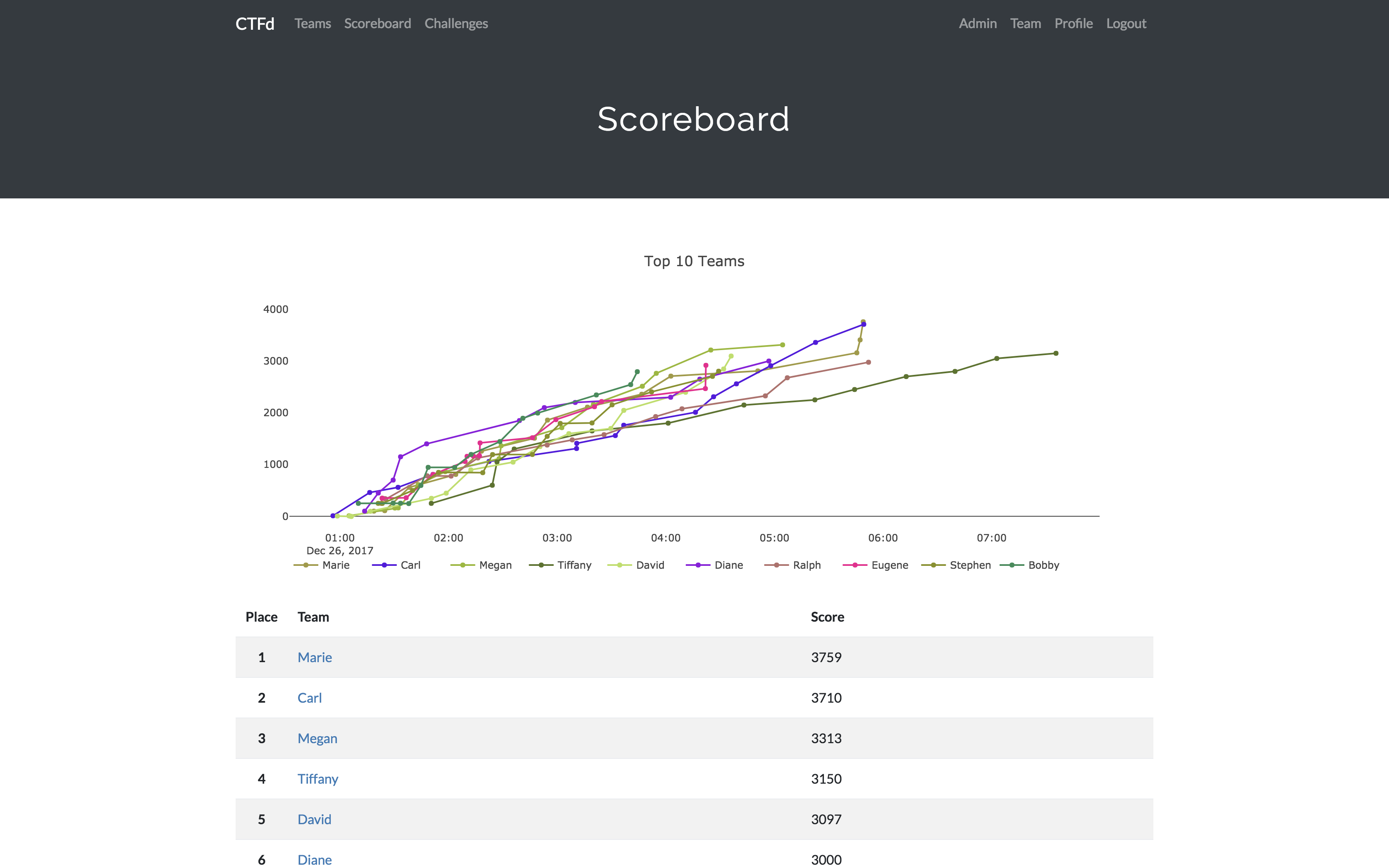
- Scoregraphs comparing the top 10 teams and team progress graphs
- Markdown content management system
- SMTP + Mailgun email support
- Email confirmation support
- Forgot password support
- Automatic competition starting and ending
- Team management, hiding, and banning
- Customize everything using the plugin and theme interfaces
- Importing and Exporting of CTF data for archival
- And a lot more...
Install
- Install dependencies:
pip install -r requirements.txt- You can also use the
prepare.shscript to install system dependencies using apt.
- You can also use the
- Modify CTFd/config.ini to your liking.
- Use
python serve.pyorflask runin a terminal to drop into debug mode.
You can use the auto-generated Docker images with the following command:
docker run -p 8000:8000 -it ctfd/ctfd
Or you can use Docker Compose with the following command from the source repository:
docker-compose up
Check out the CTFd docs for deployment options and the Getting Started guide
Live Demo
Support
To get basic support, you can join the MajorLeagueCyber Community:
If you prefer commercial support or have a special project, feel free to contact us.
Managed Hosting
Looking to use CTFd but don't want to deal with managing infrastructure? Check out the CTFd website for managed CTFd deployments.
MajorLeagueCyber
CTFd is heavily integrated with MajorLeagueCyber. MajorLeagueCyber (MLC) is a CTF stats tracker that provides event scheduling, team tracking, and single sign on for events.
By registering your CTF event with MajorLeagueCyber users can automatically login, track their individual and team scores, submit writeups, and get notifications of important events.
To integrate with MajorLeagueCyber, simply register an account, create an event, and install the client ID and client secret in the relevant portion in CTFd/config.py or in the admin panel:
OAUTH_CLIENT_ID = None
OAUTH_CLIENT_SECRET = None
Credits
- Logo by Laura Barbera
- Theme by Christopher Thompson
- Notification Sound by Terrence Martin