 0a17c73e6d
# 3.0.0 / 2020-07-27

## Changelog Summary

The CTFd v3 Changelog represents the changes from v2.5.0 to v3. It is a summarized version of the changes that occured in all CTFd v3 beta/alpha releases.

CTFd v3 contains some breaking changes but many plugins remain compatible. Themes will need some minor changes to be compatible with v3.

These changes are made with great consideration to existing installations and for the health of the overall CTFd project. If you rely on specific behavior, you can always download the last CTFd v2 release on Github. Official plugin/theme updates will be sent to the email addresses on file.

The major changes in CTFd v3 are as follows with the detailed changelog beneath:

- ### Server Side HTML/Markdown Rendering

HTML rendering in some cases (challenge description rendering, hint content rendering) has been moved to the server side. Previously it was rendered by the browser but this led to a lot of duplicated behavior and complexity in some plugins. Rendering that HTML content on the server allows CTFd to take more advantage of theme content and reduce duplicated code across themes.

In addition, HTML sanitization can be enabled on the CTFd installation to prevent the injection of malicious scripts in HTML content.

- ### CommonMark

CTFd now uses [CommonMark](https://commonmark.org/) for HTML/Markdown rendering. This leads to much more consistent rendering of HTML/Markdown content.

In some cases, this can break your HTML output. You can use our [development testing script](https://gist.github.com/ColdHeat/085c47359ab86c18864135a198cbe505) to check if your HTML output will change and correct it accordingly.

- ### Forms, Nonces, Sessions

CTFd no longer directly injects values into the global session object for a theme. You may have used this as `{{ nonce }}` or `{{ id }}`. Instead these values should be accessed via the `Session` global as so: `{{ Session.nonce }}`.

All of the public facing forms in CTFd have been converted to form globals with WTForms. You can access them via the `Form` global in Jinja. For example, `{{ Forms.auth.LoginForm() }}`. A `{{ form.nonce() }}` function is available on all forms for easier access to the CSRF nonce as well.

Old forms will still work if the nonce used in the form is updated to `{{ Session.nonce }}`.

Values provided by configuration and plugins can now be accessed via the `Configs` and `Plugins` globals. For example `{{ Configs.ctf_name }}` and `{{ Plugins.scripts }}`. See the `base.html` file of the core theme to get an idea of how to use these values.

- ### Challenge Type Plugin Enhancements

Challenge type plugins now have better re-useability with the rest of CTFd. Plugin code no longer needs to copy unchanged methods over from the base challenge plugin classes.

In addition, challenge HTML is now rendered on the server side using a new `challenge.html` file provided by the current theme. This means that the theme effectively controls how a challenge should look overall, but the challenge plugin controls the overall content.

- ### Python 3

CTFd v3 is Python 3 only.

- ### Docker image based on Debian

The Docker image used in CTFd is now based on Debian.

- ### config.ini

Instead of editting `config.py` directly, it's now a better idea to edit `config.ini` or provide your configuration via environment variables

## Detailed Changelog

**General**

- CTFd is now Python 3 only
- Render markdown with the CommonMark spec provided by `cmarkgfm`
- HTML/Markdown content is now rendered on the server side in most cases.
  - This includes challenge descriptions, hint content, and page content
- Ability to render markdown stripped of any malicious JavaScript or HTML.
  - Controlled via the `HTML_SANITIZATION` server side configuration value
- Inject `Config`, `User`, `Team`, `Session`, and `Plugin` globals into Jinja
- User sessions no longer store any user-specific attributes.
  - Sessions only store the user's ID, CSRF nonce, and an hmac of the user's password
  - This allows for session invalidation on password changes
- The user facing side of CTFd now has user and team searching
- Accept additional profile fields during registration (affiliation, website, country)
  - This does not add additional inputs. Themes or additional JavaScript can add the form inputs.

**Admin Panel**

- Use EasyMDE as an improved description/text editor for Markdown enabled fields.
- Media Library button now integrated into EasyMDE enabled fields
- VueJS now used as the underlying implementation for the Media Library
- Fix setting theme color in Admin Panel
- Green outline border has been removed from the Admin Panel
- GeoIP support now available for converting IP addresses to guessed countries
- Redesign the challenge creation form to use a radio button with challenge type selection instead of a select input

**API**

- Significant overhauls in API documentation provided by Swagger UI and Swagger json
- Make almost all API endpoints provide filtering and searching capabilities
- Change `GET /api/v1/config/<config_key>` to return structured data according to ConfigSchema
- Admins can no longer ban themselves through `PATCH /api/v1/users/[user_id]`
- Add `html` item for `GET /api/v1/hints/[hint_id]` which contains the rendered HTML of the Hint content
- Remove `content` from `GET /api/v1/hints`

**Themes**

- Themes now have access to the `Configs` global which provides wrapped access to `get_config`.
  - For example, `{{ Configs.ctf_name }}` instead of `get_ctf_name()` or `get_config('ctf_name')`
- Themes must now specify a `challenge.html` which control how a challenge should look.
- The main library for charts has been changed from Plotly to Apache ECharts.
- Forms have been moved into wtforms for easier form rendering inside of Jinja.
  - From Jinja you can access forms via the Forms global i.e. `{{ Forms }}`
  - This allows theme developers to more easily re-use a form without having to copy-paste HTML.
- Themes can now provide a theme settings JSON blob which can be injected into the theme with `{{ Configs.theme_settings }}`
- Core theme now includes the challenge ID in location hash identifiers to always refer the right challenge despite duplicate names
- Spinner centering has been switched from a hard coded margin in CSS to flexbox CSS classes from Bootstrap

**Plugins**

- Challenge plugins have changed in structure to better allow integration with themes and prevent obtrusive Javascript/XSS.
  - Challenge rendering now uses `challenge.html` from the provided theme.
  - Accessing the challenge view content is now provided by `/api/v1/challenges/<challenge_id>` in the `view` section. This allows for HTML to be properly sanitized and rendered by the server allowing CTFd to remove client side Jinja rendering.
  - `challenge.html` now specifies what's required and what's rendered by the theme. This allows the challenge plugin to avoid having to deal with aspects of the challenge besides the description and input.
  - A more complete migration guide will be provided when CTFd v3 leaves beta
- Display current attempt count in challenge view when max attempts is enabled
- `get_standings()`, `get_team_stanadings()`, `get_user_standings()` now has a fields keyword argument that allows for specificying additional fields that SQLAlchemy should return when building the response set.
  - Useful for gathering additional data when building scoreboard pages
- Flags can now control the message that is shown to the user by raising `FlagException`
- Fix `override_template()` functionality

**Deployment**

- Enable SQLAlchemy's `pool_pre_ping` by default to reduce the likelihood of database connection issues
- Mailgun email settings are now deprecated. Admins should move to SMTP email settings instead.
- Postgres is now considered a second class citizen in CTFd. It is tested against but not a main database backend. If you use Postgres, you are entirely on your own with regards to supporting CTFd.
- Docker image now uses Debian instead of Alpine. See https://github.com/CTFd/CTFd/issues/1215 for rationale.
- `docker-compose.yml` now uses a non-root user to connect to MySQL/MariaDB
- `config.py` should no longer be editting for configuration, instead edit `config.ini` or the environment variables in `docker-compose.yml`

**Miscellaneous**

- Fix an issue where email sending would be broken if the CTF name contained a colon
- Lint Markdown files with Prettier
- Lint Dockerfile and docker-compose.yml in Github Actions
- Lint JavaScript files with eslint
- Certain static strings have been converted into Enums for better re-useability throughout the code base
- Switch to using Github Actions for testing and linting
- Better handling of missing challenge types. Missing challenge types no longer bring down all other challenges.
- Documentation has been seperated out into a seperate repo (https://github.com/CTFd/docs).
- Documentation hosting has moved from ReadTheDocs to Netlify
- Any links in the codebase to help.ctfd.io have been changed to docs.ctfd.io.
4.2 KiB




What is CTFd?
CTFd is a Capture The Flag framework focusing on ease of use and customizability. It comes with everything you need to run a CTF and it's easy to customize with plugins and themes.
Features
- Create your own challenges, categories, hints, and flags from the Admin Interface
- Dynamic Scoring Challenges
- Unlockable challenge support
- Challenge plugin architecture to create your own custom challenges
- Static & Regex based flags
- Custom flag plugins
- Unlockable hints
- File uploads to the server or an Amazon S3-compatible backend
- Limit challenge attempts & hide challenges
- Automatic bruteforce protection
- Individual and Team based competitions
- Have users play on their own or form teams to play together
- Scoreboard with automatic tie resolution
- Hide Scores from the public
- Freeze Scores at a specific time
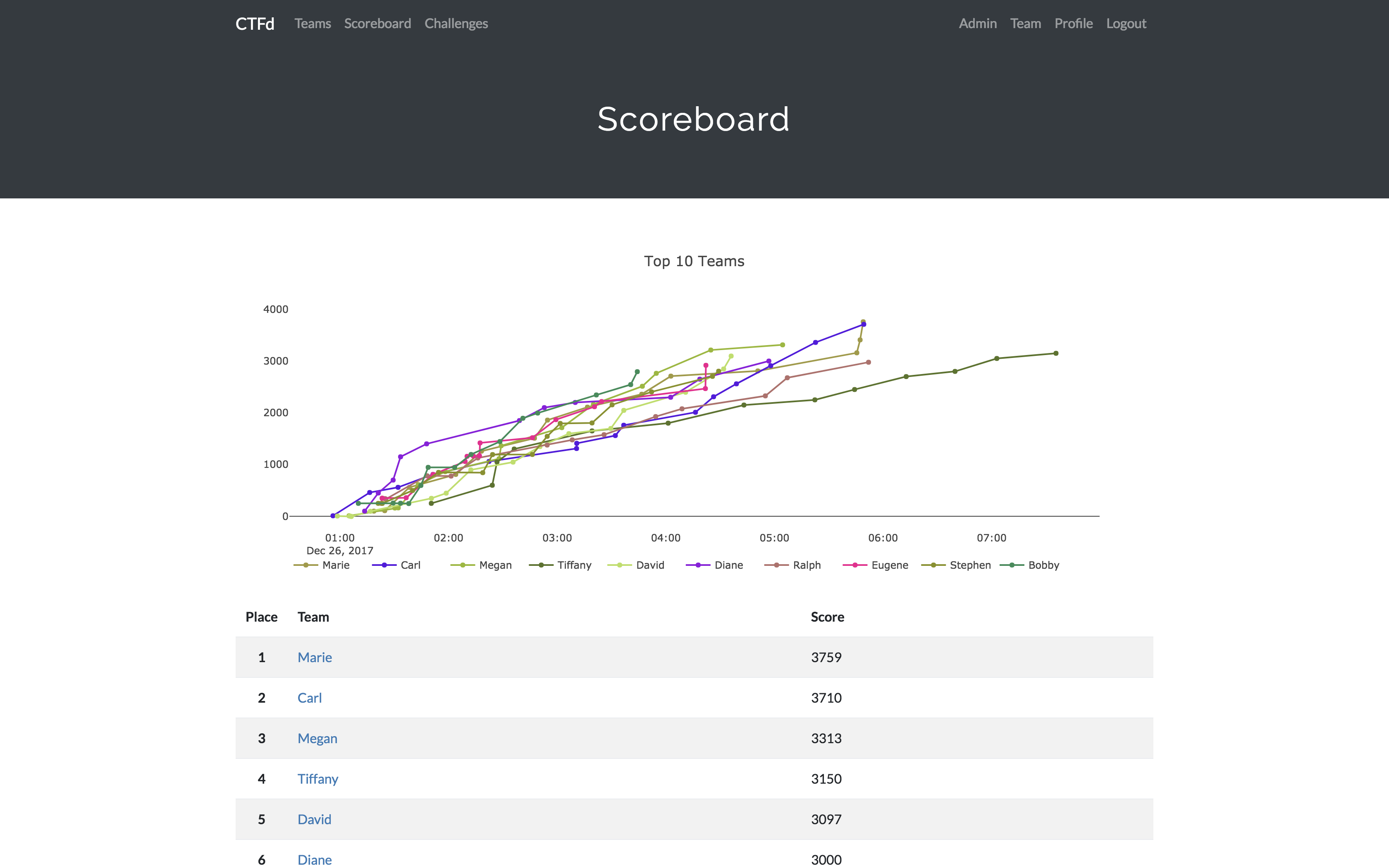
- Scoregraphs comparing the top 10 teams and team progress graphs
- Markdown content management system
- SMTP + Mailgun email support
- Email confirmation support
- Forgot password support
- Automatic competition starting and ending
- Team management, hiding, and banning
- Customize everything using the plugin and theme interfaces
- Importing and Exporting of CTF data for archival
- And a lot more...
Install
- Install dependencies:
pip install -r requirements.txt- You can also use the
prepare.shscript to install system dependencies using apt.
- You can also use the
- Modify CTFd/config.ini to your liking.
- Use
flask runin a terminal to drop into debug mode.
You can use the auto-generated Docker images with the following command:
docker run -p 8000:8000 -it ctfd/ctfd
Or you can use Docker Compose with the following command from the source repository:
docker-compose up
Check out the CTFd docs for deployment options and the Getting Started guide
Live Demo
Support
To get basic support, you can join the MajorLeagueCyber Community:
If you prefer commercial support or have a special project, feel free to contact us.
Managed Hosting
Looking to use CTFd but don't want to deal with managing infrastructure? Check out the CTFd website for managed CTFd deployments.
MajorLeagueCyber
CTFd is heavily integrated with MajorLeagueCyber. MajorLeagueCyber (MLC) is a CTF stats tracker that provides event scheduling, team tracking, and single sign on for events.
By registering your CTF event with MajorLeagueCyber users can automatically login, track their individual and team scores, submit writeups, and get notifications of important events.
To integrate with MajorLeagueCyber, simply register an account, create an event, and install the client ID and client secret in the relevant portion in CTFd/config.py or in the admin panel:
OAUTH_CLIENT_ID = None
OAUTH_CLIENT_SECRET = None
Credits
- Logo by Laura Barbera
- Theme by Christopher Thompson
- Notification Sound by Terrence Martin