
Turn your natural language descriptions into fully functional, deployed microservices with a single command! Your imagination is the limit!





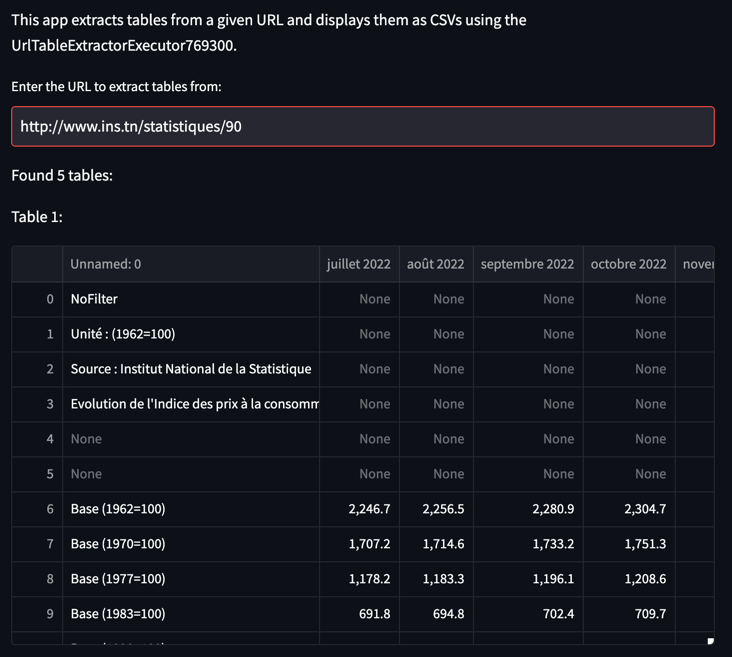
 ## Table extraction
```bash
--description "Given a URL, extract all tables as csv" --test "http://www.ins.tn/statistiques/90"
```
## Table extraction
```bash
--description "Given a URL, extract all tables as csv" --test "http://www.ins.tn/statistiques/90"
```
 ## Audio to mel spectrogram
```bash
gptdeploy --description "Create mel spectrograms from audio file" --test "https://cdn.pixabay.com/download/audio/2023/02/28/audio_550d815fa5.mp3"
```
## Audio to mel spectrogram
```bash
gptdeploy --description "Create mel spectrograms from audio file" --test "https://cdn.pixabay.com/download/audio/2023/02/28/audio_550d815fa5.mp3"
```
 ## Text to speech
```bash
gptdeploy --description "Convert text to speech" --test "Hello, welcome to GPT Deploy!"
```
## Text to speech
```bash
gptdeploy --description "Convert text to speech" --test "Hello, welcome to GPT Deploy!"
```
 ## QR Code Generator
```bash
gptdeploy --description "Generate QR code from URL" --test "https://www.example.com"
```
## QR Code Generator
```bash
gptdeploy --description "Generate QR code from URL" --test "https://www.example.com"
```
 # TO BE TESTED
## ASCII Art Generator
```bash
gptdeploy --description "Convert image to ASCII art" --test "https://images.unsplash.com/photo-1602738328654-51ab2ae6c4ff"
```
## Color Palette Generator
```bash
gptdeploy --description "creates aesthetically pleasing color palettes based on a seed color, using color theory principles like complementary or analogous colors" --test "red"
```
## Password Strength Checker
```bash
gptdeploy --description "Given a password, return a score from 1 to 10 indicating the strength of the password" --test "Pa$$w0rd"
```
## Morse Code Translator
```bash
gptdeploy --description "Convert text to morse code" --test "Hello, welcome to GPT Deploy!"
```
## IP Geolocation
```bash
gptdeploy --description "Given an IP address, return the geolocation information" --test "142.251.46.174"
```
## Rhyme Generator
```bash
gptdeploy --description "Given a word, return a list of rhyming words using the datamuse api" --test "hello"
```
## Currency Converter
```bash
gptdeploy --description "Converts any currency into any other" --test "1 usd to eur"
```
## Image Resizer
```bash
gptdeploy --description "Given an image, resize it to a specified width and height" --test "https://images.unsplash.com/photo-1602738328654-51ab2ae6c4ff"
```
## Weather API
```bash
gptdeploy --description "Given a city, return the current weather" --test "Berlin"
```
## Sudoku Solver
```bash
gptdeploy --description "Given a sudoku puzzle, return the solution" --test "[[2, 5, 0, 0, 3, 0, 9, 0, 1], [0, 1, 0, 0, 0, 4, 0, 0, 0], [4, 0, 7, 0, 0, 0, 2, 0, 8], [0, 0, 5, 2, 0, 0, 0, 0, 0], [0, 0, 0, 0, 9, 8, 1, 0, 0], [0, 4, 0, 0, 0, 3, 0, 0, 0], [0, 0, 0, 3, 6, 0, 0, 7, 2], [0, 7, 0, 0, 0, 0, 0, 0, 3], [9, 0, 3, 0, 0, 0, 6, 0, 4]]"
```
## Carbon Footprint Calculator
```bash
gptdeploy --description "Estimate a company's carbon footprint based on factors like transportation, electricity usage, waste production etc..." --test "Jina AI"
```
## Real Estate Valuation Estimator
```bash
gptdeploy --description "Create a microservice that estimates the value of a property based on factors like location, property type, age, and square footage." --test "Berlin Friedrichshain, Flat, 100m², 10 years old"
```
## Chemical Structure Drawing
```bash
gptdeploy --description "Convert a chemical formula into a 2D chemical structure diagram" --test "C6H6"
```
## Gene Sequence Alignment
```bash
gptdeploy --description "Align two DNA or RNA sequences using the Needleman-Wunsch algorithm" --test "AGTC, GTCA"
```
## Markdown to HTML Converter
```bash
gptdeploy --description "Convert markdown to HTML" --test "# Hello, welcome to GPT Deploy!"
```
## Barcode Generator
```bash
gptdeploy --description "Generate a barcode from a string" --test "Hello, welcome to GPT Deploy!"
```
## File Compression
```bash
gptdeploy --description "Compress a file using the gzip algorithm" --test "content of the file: Hello, welcome to GPT Deploy!"
```
## Meme Generator
```bash
gptdeploy --description "Generate a meme from an image and a caption" --test "Surprised Pikachu: https://media.wired.com/photos/5f87340d114b38fa1f8339f9/master/w_1600%2Cc_limit/Ideas_Surprised_Pikachu_HD.jpg, TOP:When you see GPT Deploy create and deploy a microservice in seconds"
```
## Watermarking Images
```bash
gptdeploy --description "Add a watermark (GPT Deploy) to an image" --test "https://images.unsplash.com/photo-1602738328654-51ab2ae6c4ff"
```
## File Metadata Extractor
```bash
gptdeploy --description "Extract metadata from a file" --test "https://images.unsplash.com/photo-1602738328654-51ab2ae6c4ff"
```
## Video Thumbnail Extractor
```bash
gptdeploy --description "Extract a thumbnail from a video" --test "http://techslides.com/demos/sample-videos/small.mp4"
```
## Gif Maker
```bash
gptdeploy --description "Create a gif from a list of images" --test "https://images.unsplash.com/photo-1564725075388-cc8338732289, https://images.unsplash.com/photo-1584555684040-bad07f46a21f, https://images.unsplash.com/photo-1584555613497-9ecf9dd06f68"
```
## Heatmap Generator
```bash
gptdeploy --description "Create a heatmap from an image and a list of relative coordinates" --test "[[0.1, 0.2], [0.3, 0.4], [0.5, 0.6], [0.2, 0.1], [0.7, 0.2], [0.4, 0.2]]"
```
# 🔮 vision
Use natural language interface to create, deploy and update your microservice infrastructure.
# TODO
critical
- [ ] add buttons to README.md
- [ ] fix problem with package installation
- [ ] add more interesting examples to README.md
- [ ] api key in install instruction
- [ ] add instruction about cleanup of deployments
- [ ] add logo
Nice to have
- [ ] hide prompts in normal mode and show them in verbose mode
- [ ] tests
- [ ] clean up duplicate code
- [ ] support popular cloud providers - lambda, cloud run, cloud functions, ...
- [ ] support local docker builds
- [ ] autoscaling enabled for cost saving
- [ ] don't show this message:
🔐 You are logged in to Jina AI as florian.hoenicke (username:auth0-unified-448f11965ce142b6).
To log out, use jina auth logout.
- [ ] add more examples to README.md
- [ ] support multiple endpoints - example: todolist microservice with endpoints for adding, deleting, and listing todos
- [ ] support stateful microservices
- [ ] The playground is currently printed twice even if it did not change.
Make sure it is only printed twice in case it changed.
- [ ] allow to update your microservice by providing feedback
- [ ] bug: it can happen that the code generation is hanging forever - in this case aboard and redo the generation
- [ ] feat: make playground more stylish by adding attributes like: clean design, beautiful, like it was made by a professional designer, ...
[](https://user-images.githubusercontent.com/11627845/226220484-17810f7c-b184-4a03-9af2-3a977fbb014b.mov)
# TO BE TESTED
## ASCII Art Generator
```bash
gptdeploy --description "Convert image to ASCII art" --test "https://images.unsplash.com/photo-1602738328654-51ab2ae6c4ff"
```
## Color Palette Generator
```bash
gptdeploy --description "creates aesthetically pleasing color palettes based on a seed color, using color theory principles like complementary or analogous colors" --test "red"
```
## Password Strength Checker
```bash
gptdeploy --description "Given a password, return a score from 1 to 10 indicating the strength of the password" --test "Pa$$w0rd"
```
## Morse Code Translator
```bash
gptdeploy --description "Convert text to morse code" --test "Hello, welcome to GPT Deploy!"
```
## IP Geolocation
```bash
gptdeploy --description "Given an IP address, return the geolocation information" --test "142.251.46.174"
```
## Rhyme Generator
```bash
gptdeploy --description "Given a word, return a list of rhyming words using the datamuse api" --test "hello"
```
## Currency Converter
```bash
gptdeploy --description "Converts any currency into any other" --test "1 usd to eur"
```
## Image Resizer
```bash
gptdeploy --description "Given an image, resize it to a specified width and height" --test "https://images.unsplash.com/photo-1602738328654-51ab2ae6c4ff"
```
## Weather API
```bash
gptdeploy --description "Given a city, return the current weather" --test "Berlin"
```
## Sudoku Solver
```bash
gptdeploy --description "Given a sudoku puzzle, return the solution" --test "[[2, 5, 0, 0, 3, 0, 9, 0, 1], [0, 1, 0, 0, 0, 4, 0, 0, 0], [4, 0, 7, 0, 0, 0, 2, 0, 8], [0, 0, 5, 2, 0, 0, 0, 0, 0], [0, 0, 0, 0, 9, 8, 1, 0, 0], [0, 4, 0, 0, 0, 3, 0, 0, 0], [0, 0, 0, 3, 6, 0, 0, 7, 2], [0, 7, 0, 0, 0, 0, 0, 0, 3], [9, 0, 3, 0, 0, 0, 6, 0, 4]]"
```
## Carbon Footprint Calculator
```bash
gptdeploy --description "Estimate a company's carbon footprint based on factors like transportation, electricity usage, waste production etc..." --test "Jina AI"
```
## Real Estate Valuation Estimator
```bash
gptdeploy --description "Create a microservice that estimates the value of a property based on factors like location, property type, age, and square footage." --test "Berlin Friedrichshain, Flat, 100m², 10 years old"
```
## Chemical Structure Drawing
```bash
gptdeploy --description "Convert a chemical formula into a 2D chemical structure diagram" --test "C6H6"
```
## Gene Sequence Alignment
```bash
gptdeploy --description "Align two DNA or RNA sequences using the Needleman-Wunsch algorithm" --test "AGTC, GTCA"
```
## Markdown to HTML Converter
```bash
gptdeploy --description "Convert markdown to HTML" --test "# Hello, welcome to GPT Deploy!"
```
## Barcode Generator
```bash
gptdeploy --description "Generate a barcode from a string" --test "Hello, welcome to GPT Deploy!"
```
## File Compression
```bash
gptdeploy --description "Compress a file using the gzip algorithm" --test "content of the file: Hello, welcome to GPT Deploy!"
```
## Meme Generator
```bash
gptdeploy --description "Generate a meme from an image and a caption" --test "Surprised Pikachu: https://media.wired.com/photos/5f87340d114b38fa1f8339f9/master/w_1600%2Cc_limit/Ideas_Surprised_Pikachu_HD.jpg, TOP:When you see GPT Deploy create and deploy a microservice in seconds"
```
## Watermarking Images
```bash
gptdeploy --description "Add a watermark (GPT Deploy) to an image" --test "https://images.unsplash.com/photo-1602738328654-51ab2ae6c4ff"
```
## File Metadata Extractor
```bash
gptdeploy --description "Extract metadata from a file" --test "https://images.unsplash.com/photo-1602738328654-51ab2ae6c4ff"
```
## Video Thumbnail Extractor
```bash
gptdeploy --description "Extract a thumbnail from a video" --test "http://techslides.com/demos/sample-videos/small.mp4"
```
## Gif Maker
```bash
gptdeploy --description "Create a gif from a list of images" --test "https://images.unsplash.com/photo-1564725075388-cc8338732289, https://images.unsplash.com/photo-1584555684040-bad07f46a21f, https://images.unsplash.com/photo-1584555613497-9ecf9dd06f68"
```
## Heatmap Generator
```bash
gptdeploy --description "Create a heatmap from an image and a list of relative coordinates" --test "[[0.1, 0.2], [0.3, 0.4], [0.5, 0.6], [0.2, 0.1], [0.7, 0.2], [0.4, 0.2]]"
```
# 🔮 vision
Use natural language interface to create, deploy and update your microservice infrastructure.
# TODO
critical
- [ ] add buttons to README.md
- [ ] fix problem with package installation
- [ ] add more interesting examples to README.md
- [ ] api key in install instruction
- [ ] add instruction about cleanup of deployments
- [ ] add logo
Nice to have
- [ ] hide prompts in normal mode and show them in verbose mode
- [ ] tests
- [ ] clean up duplicate code
- [ ] support popular cloud providers - lambda, cloud run, cloud functions, ...
- [ ] support local docker builds
- [ ] autoscaling enabled for cost saving
- [ ] don't show this message:
🔐 You are logged in to Jina AI as florian.hoenicke (username:auth0-unified-448f11965ce142b6).
To log out, use jina auth logout.
- [ ] add more examples to README.md
- [ ] support multiple endpoints - example: todolist microservice with endpoints for adding, deleting, and listing todos
- [ ] support stateful microservices
- [ ] The playground is currently printed twice even if it did not change.
Make sure it is only printed twice in case it changed.
- [ ] allow to update your microservice by providing feedback
- [ ] bug: it can happen that the code generation is hanging forever - in this case aboard and redo the generation
- [ ] feat: make playground more stylish by adding attributes like: clean design, beautiful, like it was made by a professional designer, ...
[](https://user-images.githubusercontent.com/11627845/226220484-17810f7c-b184-4a03-9af2-3a977fbb014b.mov)